

Mario Teaches Typing (1992)
The game that made Mario talk. Developed and published by Interplay Productions in 1992, Mario Teaches Typing is a typing tutor starring Mario, Luigi and Princess Peach — and the very first video game in which Mario has a speaking voice. Ronald B. Ruben voiced him on floppy disk; Charles Martinet replaced him on the 1994 CD-ROM, beginning a 30-year run as the voice of Mario.
Overview

Mario Teaches Typing is an educational typing game developed and published by Interplay Productions for MS-DOS in 1992. It is one of only a handful of licensed Mario titles for personal computers, and easily one of the most historically significant — despite its obscurity.
The game’s entire purpose is exactly what the title suggests: Mario teaches you to type. But wrapped around that dry educational core is a bright, Super Mario World-themed presentation, six difficulty levels, three playable characters, and — in its 1994 CD-ROM edition — the debut of Charles Martinet as the voice of Mario, a role he would hold for over 30 years.
The game was inspired by Mavis Beacon Teaches Typing, then one of the most successful educational software titles on the market. Interplay founder Brian Fargo saw the opportunity to bring Nintendo’s biggest character to the same genre, pitched the idea to Nintendo, and secured the licence.
The result shipped on floppy disk in 1992 and sold remarkably well — 800,000 copies total, with the Mac version alone reportedly accounting for over 500,000 of those. It appeared in the top ten of educational software sales charts every year from 1992 to 1996.
All of the game’s music was sampled and adapted from Super Mario World — the most recent mainline Mario game at the time of development. The visual aesthetic leans heavily on SMW as well, with Koopa Troopas, Boss Bass, Bloopers and Thwomps all appearing as interactive elements in the different typing modes.
“In a clever marketing move, Interplay has moved the animated characters from the Nintendo-based Mario games into the first typing tutor designed for kids. Mario Teaches Typing offers an entertaining twist to a subject that normally would hold little appeal for grade-schoolers.” — Randy Chase, The Oregonian
Development & Origin

The concept came entirely from Brian Fargo, head of Interplay Productions. Having watched Mavis Beacon Teaches Typing — developed by The Software Toolworks — become a hit, Fargo concluded that the key to its success was personality: giving a dry skill like typing a fun, engaging wrapper. He decided Mario was the perfect character to do the same thing, and approached Nintendo with the idea.
Nintendo approved the licence, somewhat surprisingly given that the Mario PC games of this era were generally developed without close Nintendo oversight. The creator of Mavis Beacon Teaches Typing, Les Crane, was apparently furious when he heard about the project, and relations between Crane and Fargo reportedly soured afterwards — with one account suggesting Crane gave Fargo “the stinkeye” at an industry event, before the two later reconciled.
The game shipped in 1992 on two 3.5″ floppy disks (or a single 5.25″). A Mac port followed in 1993. Then in 1994, Interplay released the enhanced CD-ROM version for MS-DOS and Windows — a significantly expanded edition with updated visuals, a story mode, and crucially, a new voice for Mario.
The success of Mario Teaches Typing had lasting consequences beyond the game itself. Fargo noted that Nintendo’s Shigeru Miyamoto was happy with the product.
The title’s strong sales convinced Nintendo to continue licensing educational computer games; it went on to partner with The Software Toolworks for the Mario Discovery Series (Mario is Missing!, Mario’s Time Machine, Mario’s Early Years!) in 1993. Interplay maintained its Nintendo relationship too, going on to produce Mario’s Game Gallery in 1995.
The Voice of Mario — A Historical First
🎙️ Mario speaks for the very first time
Mario Teaches Typing (1992) is the first video game in which Mario has a speaking voice. The original floppy disk version used Ronald B. Ruben — an actor who has largely remained uncredited and unknown. The 1994 CD-ROM version replaced Ruben with Charles Martinet, beginning a voicing career that lasted over 30 years and encompassed more than 150 games.
The floppy disk version of Mario Teaches Typing (1992) is Mario’s first spoken appearance in any video game. Ronald B. Ruben voiced the character for this release — his only credited Mario role. While his performance isn’t well documented, his casting establishes an important precedent: Interplay understood that a talking Mario was a selling point, not an afterthought.
For the 1994 CD-ROM enhanced edition, Nintendo had Charles Martinet replace Ruben. Martinet had been voicing Mario since 1990 through Nintendo’s “Mario in Real Time” trade show exhibition — an early motion capture system where his facial movements drove a 3D Mario head that could hold live conversations with passers-by. He had also appeared in the 1992 Super Mario Bros. pinball machine. But the CD-ROM version of Mario Teaches Typing was his first credited video game release.
Martinet’s involvement with the script shaped the character in a profound way. When he received the script and saw lines like “That wasn’t very good” and “That was a failure”, he objected strongly.
Martinet felt Mario should never be discouraging to a child learning a difficult skill. He was given permission to rewrite those lines, replacing them with encouragements like “Not as good this time, but you can do better!”, “That was great — try again!” and “Oh!
Nice one, keep going!” Martinet has cited this moment as the one that crystallised what Mario’s personality should be: always positive, always supportive, always joyful.
Martinet later said Mario Teaches Typing was one of his favourite and most important Mario projects precisely because of this experience — it was the game that made him understand Mario from a child’s perspective, and established the warm, encouraging voice we know from all subsequent titles.
Gameplay
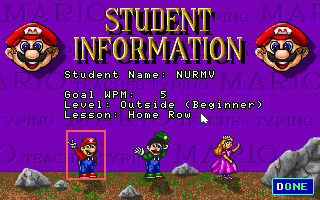
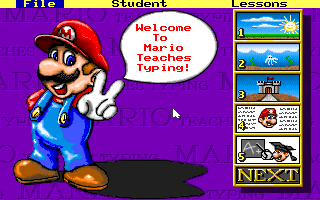
On starting the game, the player creates a profile and selects their teacher: Mario, Luigi, or Princess Peach. None of the three have different abilities — the choice is purely cosmetic. Each profile tracks a target WPM (words per minute) goal, starting at 5 WPM. The Lessons menu lets you choose which keyboard zones to practice: Home Row Only, Add Top Row, Add Bottom Row, Add Numbers, Add Symbols, or All Keyboard.
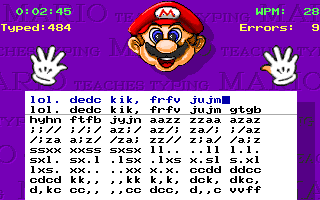
The core loop in all gameplay modes is the same: letters, words, or sentences appear on screen associated with enemies or objects from Super Mario World, and you must type the correct key to interact with them. Type correctly and Mario advances; fail to type in time and Mario is blocked.
Each mode has a dashboard showing elapsed time, average WPM, incorrect keypresses, and total keys typed. On-screen hand illustrations show correct finger placement throughout — the left pinky for “A”, and so on.
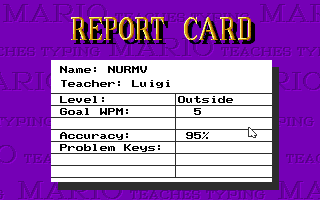
After each session, a results screen shows Mario in a scholar’s outfit, pointing at your statistics on a chalkboard. Completing every challenge unlocks a certificate displaying “Congratulations!” with ASCII art of Mario and your most recently completed mode.
The Five Modes


The CD-ROM Enhanced Version (1994)
The 1994 CD-ROM version is a substantial upgrade over the floppy original. The most immediately noticeable addition is Mario’s floating 3D head, displayed prominently on the menu and used to introduce each game mode. This head was rendered using SimGraphics’ VActor (Virtual Actor) Character Animation technology — the same system used for Nintendo’s “Mario in Real Time” trade show exhibitions. Charles Martinet, who ran those exhibitions, was the natural choice to voice the CD version.
The CD version also adds a brief story: Mario and Luigi come across a magical typewriter. When Mario mistypes a phrase intended to destroy Bowser’s Castle, the typewriter explodes, scattering its pieces across several different areas. A surviving piece implores Mario to find the others — framing the typing practice as a quest to reassemble the typewriter and finish off Bowser. It’s thin as narratives go, but it gives the game a sense of purpose beyond pure education.
The interface was updated with improved animations, new voice clips from Martinet, and bug fixes. The floating Mario head reacting in real time to your typing performance — smiling when you type well, looking pained when you make errors — was a genuinely novel piece of technology for a 1994 PC game, and likely contributed significantly to the strong Mac sales figures.
“The 1994 version includes a storyline in which Mario and Luigi are tasked with finding the pieces of a magical typewriter that, when joined together, would destroy Bowser’s castle. It also marked one of Charles Martinet’s earliest titles as the voice of Mario.” — That’s Edutainment (The Avocado)
Mario Teaches Typing 2 (1997)
A sequel, Mario Teaches Typing 2, was developed by Brainstorm Entertainment and published by Interplay in 1997. Martinet is the sole voice actor in this version.
The sequel is most infamous for its giant animated Mario head — larger and more expressive than the CD version’s head, and frankly rather unsettling to modern eyes. It features a colour-coded on-screen keyboard, personalised lesson plans, and a customisable achievement certificate.
Some critics praised the improved features; others found the Mario head distracting for younger players.
Characters & Sprites
The MS-DOS version uses distinctive pixel-art sprites for all characters. Mario, Luigi and Peach have walking animations used during gameplay; enemies include Koopa Troopas, Bloopers, Boss Bass, and Thwomps. The Mac version has slightly different sprite designs for several characters.
 Mario (walk)
 Mario (DOS)
 Luigi (DOS)
 Peach (DOS)
 Koopa Troopa
 Bowser
Manual & Pre-release Screenshots
The printed manual for Mario Teaches Typing was produced from an earlier build of the game. Several screenshots in the manual show a different main menu layout, a different interface for Expert Express mode, and a different results screen — making the manual itself an interesting piece of pre-release documentation.
Manual p.7 — early main menu Manual p.15 — early Expert Express
Box Art & Releases
 MS-DOS (1992)
 Macintosh front (1993)
 Macintosh back
| Version | Year | Platform | Voice | Notes |
|---|---|---|---|---|
| Mario Teaches Typing | 1992 | MS-DOS | Ronald B. Ruben | Original floppy release. 3.5″ and 5.25″ disk. First time Mario speaks in any game. |
| Mario Teaches Typing | 1993 | Macintosh | Ronald B. Ruben | Mac port. Reportedly sold 500,000+ copies on this platform alone. |
| Mario Teaches Typing (Enhanced CD-ROM) | 1994 | MS-DOS / Windows | Charles Martinet | Major upgrade — floating 3D Mario head, story mode, VActor technology, new voice. |
| Mario Teaches Typing | 1995 | Windows / Mac | Charles Martinet | Further Windows and Mac releases of the enhanced version. |
| Mario Teaches Typing 2 | 1997 | Windows / Mac | Charles Martinet | Sequel by Brainstorm/Interplay. Giant floating head, colour keyboard, lesson plans. |
Reception
Contemporary reviews were generally positive, particularly for the Macintosh version. Randy Chase of The Oregonian praised it as “an entertaining twist to a subject that normally would hold little appeal for grade-schoolers.”
Brett Alan Weiss of All Game Guide scored it 7/10, noting that “the appearance of arcade-like action will keep most kids entertained for awhile.”
An archived 1998 review described it as “the most entertaining of the many excellent typing tutors now on the market,” with the Mario franchise’s “skidding turtles, exploding blocks and bizarre assortment of antagonists translating nicely into this hybrid teaching/entertaining title.”
The most consistent criticism across reviews was about its usefulness as a typing tutor for older or more experienced typists. Reviewers felt Mario Teaches Typing was clearly better suited to children than Mavis Beacon, and that the educational content — particularly in the floppy version — was somewhat thin. The CD-ROM version’s story mode and updated interface addressed some of these concerns.
In retrospective coverage, the game earned its place in Mario history primarily because of the voice angle. It frequently appears in articles about Charles Martinet, “firsts” in the Mario franchise, and obscure Nintendo-licensed PC titles. Authors Wesley and Barczak grouped it among the “flood of ill-conceived Mario spin-offs” of the 1990s — though 800,000 copies and a four-year run in the educational sales charts suggests the market disagreed rather firmly.
Trivia & Facts
- Mario Teaches Typing is the first video game in which Mario has a speaking voice — the 1992 floppy version, voiced by Ronald B. Ruben, predates everything else including Super Mario 64 by four years.
- The 1994 CD-ROM version is the first credited video game to feature Charles Martinet as Mario. Although Mario’s Game Gallery (released February 1995) is often cited as Martinet’s debut, Mario Teaches Typing CD-ROM came out in 1994.
- Martinet rewrote lines in the script that said things like “You failed” and “That wasn’t very good”, replacing them with positive encouragements. He has said this moment defined Mario’s personality for all future games.
- The floating 3D Mario head in the CD version used SimGraphics’ VActor technology — the same motion-capture system that powered Nintendo’s “Mario in Real Time” trade show exhibitions where Martinet had been voicing Mario since 1990.
- The Macintosh version alone reportedly sold over 500,000 copies — more than half the game’s total sales of 800,000. It was one of the best-selling educational Mac titles of the early 1990s.
- All in-game music was sampled and adapted from Super Mario World — the most recent mainline Mario title at the time of development.
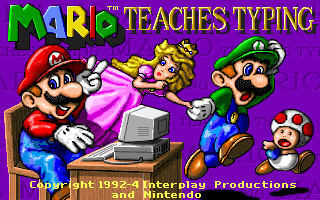
- Although Toad appears on the title screen of the 1992 version, he plays no part in the game and does not appear anywhere else. He simply stands there. No explanation has ever been given.
- The game’s printed manual was produced from an earlier build — multiple pages show screenshots of a different main menu layout, a different Expert Express interface, and a different results screen.
- Expert Express mode has a bug: if you accumulate more than 1,000 errors, the error counter wraps around and continues from the left side of the screen.
- The creator of Mavis Beacon Teaches Typing, Les Crane, was reportedly furious about the existence of Mario Teaches Typing and gave Interplay’s Brian Fargo “the stinkeye” at an industry event. The two later made up.
- Mario Teaches Typing appeared in the top ten educational software sales charts every year from 1992 to 1996 — an unusually long chart run for a niche PC title of this era.
- The success of the game directly led to Nintendo’s broader educational games push: the Mario Discovery Series (Mario is Missing!, Mario’s Time Machine, the Early Years games) was launched in 1993 partly on the strength of Mario Teaches Typing’s sales.
Screenshots Gallery
Title screen (1992 DOS)Title screen (1994 CD-ROM)Main menuCharacter selectOutdoor World (beginner) Outdoor — coin bonusUnderwater World (intermediate)Underground World (advanced)Expert Express (expert)Report card
 Results screenEarly build (manual p.7)
Video
Gameplay footage from Mario Teaches Typing — showing the typing modes, Mario’s voice reactions, and the overall presentation of this historically significant title.
Reference & Downloads
Mario Teaches Typing is considered abandonware and can be freely played or downloaded.